Tickweek: Weekly-focused task planner for Apple users
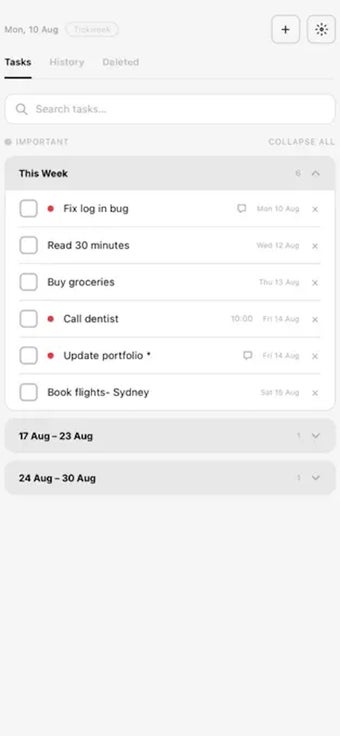
Tickweek, developed by Rodrigo Lamberti, is a weekly-focused task manager for the Apple ecosystem that shifts planning from daily checklists to a seven-day perspective. The app displays a week-centric layout, supports per-task reminders, task history, and automatic carry-over to keep items visible between cycles. It separates work and personal areas with Spaces and synchronizes data via iCloud, aimed at professionals and students who prefer a broader planning horizon to balance workload and commitments.
What is Tickweek used for?
Tickweek targets users who find daily to-do lists constraining and prefer organizing work over a seven-day span. The app is built around a weekly view that lets users see upcoming effort across the week rather than a single day, and it offers task history for reviewing completed items. This orientation is suitable for people managing overlapping projects, study schedules, or recurring weekly responsibilities within Apple device workflows.
How does the app structure a week's work?
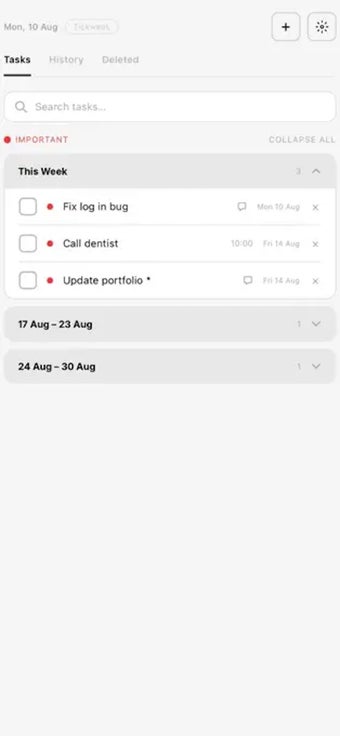
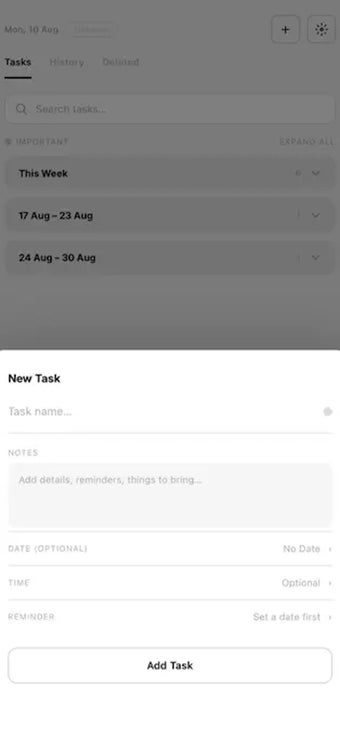
The core workflow focuses on short planning cycles and keeping unfinished work visible. Users can flag important tasks, attach reminders to individual items, and rely on an automatic carry-over mechanism that moves unfinished entries forward. Typical outputs are a curated weekly checklist and an archive of completed tasks. Key work steps include creating tasks, assigning reminders, sorting items into Spaces, and reviewing task history for accountability.
Is Tickweek easy to adopt for professionals?
The interface follows a minimalist aesthetic, which reduces visual clutter and highlights scheduled items. That design lowers entry friction for users who already use Apple apps, but the weekly-first approach requires a scheduling habit change for those accustomed to daily micro-lists. Dark and light modes match system appearance, and the independent developer background indicates continued iteration rather than corporate-scale feature sets.
How does Tickweek handle cross-device syncing and compatibility?
Tickweek uses iCloud synchronization to keep tasks aligned across iPhone, iPad, and Mac, which supports single users who work on multiple Apple devices. This behavior ensures consistent state between devices without manual exports. The app's platform focus makes it well integrated inside Apple workflows, and teams or users who require non-Apple platform parity should note the Apple-centric sync model as a platform consideration.
Tickweek fits Apple-centric planners who prefer a weekly horizon
Tickweek is a practical choice for individual professionals and students who use multiple Apple devices and want a single, device-synced planning environment. Its design rewards users willing to shift from day-by-day tasking to weekly scheduling, while those who need broad cross-platform collaboration or prefer fine-grained daily micro-management may find the approach less aligned with their workflow needs.